Back to Experience
Login & Register with Google
Frontend Developer
2025 - 2026
Role & Responsibility
The primary purpose of LaravelLogin_register is to serve as a robust Authentication Boilerplate (or starter kit) for a modern web application.
Impact & Achievements
- Developed key user-facing features and modular components.
- Optimized application performance and responsiveness.
- Collaborated in a cross-functional team using Agile methodologies.
Tech Stack
Vue.jsInertia.jsLaravel 12Tailwind CSS
1. The Purpose
Core Purpose
Instead of writing an entire login structure from scratch every time you start a new application, this repository provides:
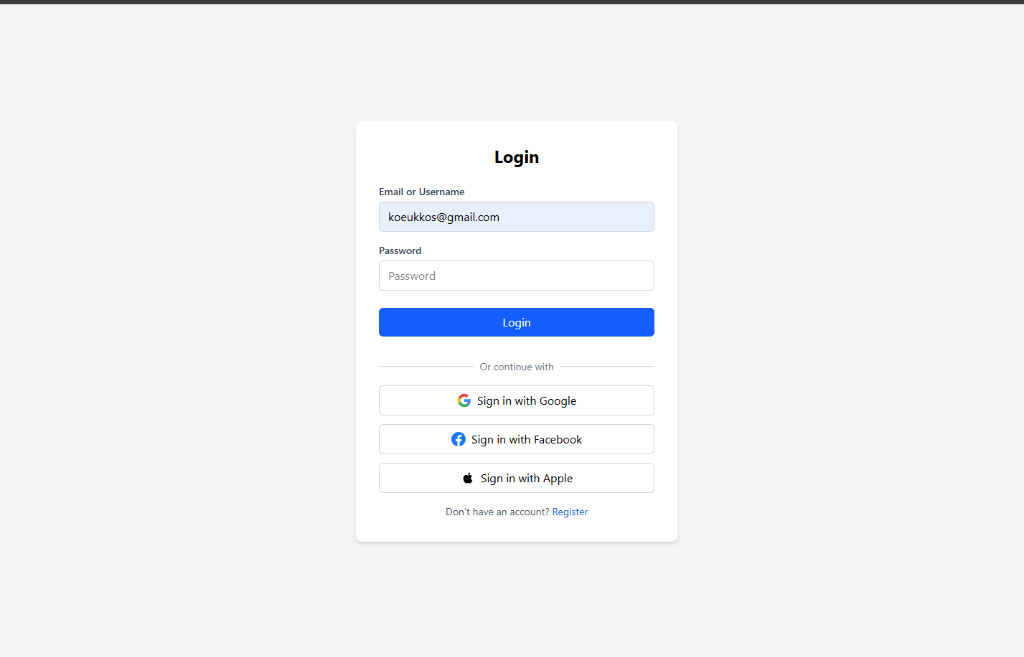
- A fully functional standard login and registration system.
- Seamless Single Sign-On (SSO) integration linking a user to their Google, Facebook, and Apple accounts.
- A dashboard and user profile management page where users can update their details and passwords securely.
🛠 2. Programs and Technologies Used
VILT Stack
This project is built using the VILT Stack (Vue, Inertia, Laravel, Tailwind), a modern and highly popular tech stack combo:
- Backend / Core Engine: Laravel 12 (PHP 8.2+). Laravel handles all business logic, database queries, routing, middleware security, and session management.
- Frontend UI: Vue.js 3 (JavaScript). Vue handles all the interactive visual elements (components, pages, forms).
- The Bridge: Inertia.js. Inertia acts as the 'glue' between Laravel and Vue. It allows you to build a Single-Page Application (SPA) without needing to configure complex, separate REST APIs.
- Styling: Tailwind CSS 4.0. A utility-first CSS framework used to design the user interface without writing custom CSS files.
- Authentication Package: Laravel Socialite. Makes social OAuth integrations (Google, Facebook, Apple) incredibly simple and secure.
- Bundler: Vite. Responsible for compiling and hot-reloading your Vue components and Tailwind styles during development.
🔄 3. Application Workflow
Guest Access & Authentication
A. Guest Access & Authentication. When a guest visits the root URL (/), they are automatically redirected to Login.vue.
- Choice of Login (Standard): A user submits their email and password. The LoginController validates it and creates a session.
- Social Login: A user clicks 'Sign in with Google'. The GoogleController calls Socialite to redirect the user to Google's permission screen.
- Callback: The app reads the user's Google ID. If it's a new user, it saves their info and logs them in automatically.
Authenticated State
B. Authenticated State
- Dashboard: User is redirected to /dashboard. Protected by auth middleware, only logged-in users can reach it.
- Profile Management: Navigate to /profile to update standard info (fullname, username) and change password securely.
- Logout: Triggers a POST request to /logout, destroying the secure session and sending user back to login page.